
PolyGres
The intelligent gateway for Postgres.
Connect, secure, control, and accelerate every application and AI agent accessing Postgres — regardless of the protocol they speak.
Connect · Protect · Control · Accelerate · Observe
Oracle · MySQL · SQL Server · MongoDB · OpenSearch · DynamoDB · SQS · PostgreSQL · gRPC · MCP
Everything talks to Postgres.
One control point for every Postgres workload.
PolyWire
Put an intelligent control point in front of Postgres.#
Connect
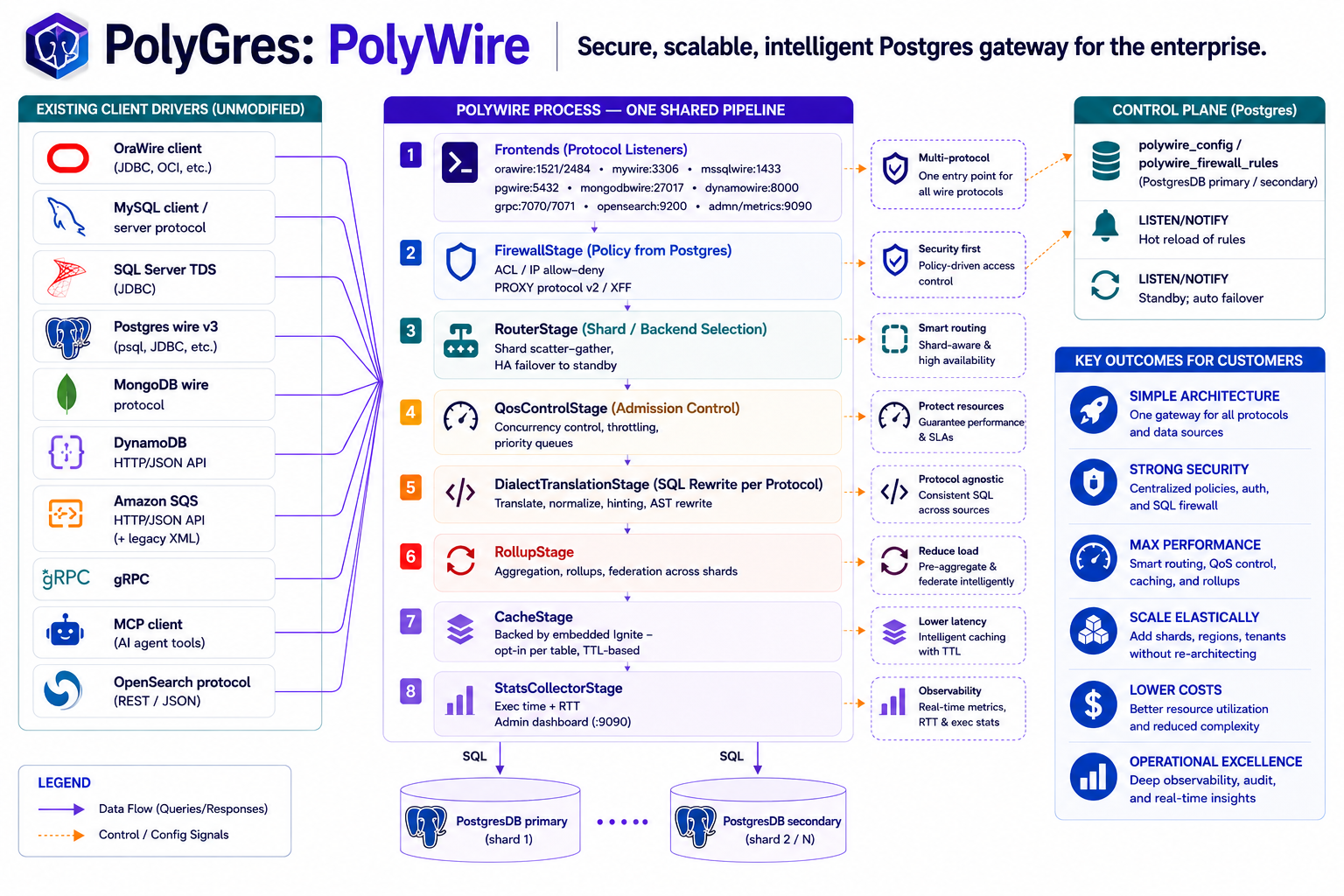
Any client. One Postgres — with live semantic execution translation, not just protocol framing. Oracle, MySQL, SQL Server, MongoDB, OpenSearch, DynamoDB, SQS, PostgreSQL, gRPC, and MCP — every one keeps its own driver and protocol.
Protect
A SQL firewall, connection ACL, authentication, and Postgres row-level security identity all apply before a request reaches Postgres — the same policies regardless of which protocol the caller speaks.
Control
QoS admission control, routing, connection pooling, sharding, and planned/unplanned failover — protect backend capacity and keep Postgres available under load.
Accelerate
PolyCache serves repeat reads without a Postgres round trip; rollups keep pre-aggregated tables fresh automatically.
Observe
See every request before it reaches Postgres — client → protocol → SQL → policy → route → backend → latency → error — exported to the tools you already run.
Different protocols. Same policies. Same Postgres. One control point for every Postgres workload.
What is PolyWire?#
See how PolyWire works, stage by stage → — the detailed eight-stage pipeline behind this diagram.
Four ways teams put PolyWire to work#
Modernize databases
Move Oracle, MySQL, SQL Server, or MongoDB applications onto Postgres without an immediate client rewrite — every protocol keeps working exactly as it always has.
Build a Postgres control point
Firewall, QoS, routing, pooling, and failover in one admin surface — instead of five databases' own tooling, run indefinitely, not just during a migration.
Scale Postgres horizontally
Route tenants, customers, or predicates across shards and merge results centrally — without the application knowing sharding exists.
Govern AI access
MCP and AI agents enter through the exact same firewall, QoS, and audit path as every other client — not a separate, unguarded route to your data.
Explore all PolyWire capabilities →
See it happen#
Pick a protocol — same demo, different client, same PostgreSQL on the other end.
$ sql app/password@//localhost:11521/postgres

SQLcl: Release 23.4 Production

SQL> SELECT * FROM orders;

ORDER_ID  CUSTOMER_ID  AMOUNT
--------  -----------  -------
    1001           42   129.99
    1002           57    89.50

2 rows selected.

SQL>
$ mysql -h 127.0.0.1 -P 13306 -u root -p

mysql> SELECT * FROM orders;

+----------+-------------+--------+
| order_id | customer_id | amount |
+----------+-------------+--------+
|     1001 |          42 | 129.99 |
|     1002 |          57 |  89.50 |
+----------+-------------+--------+
2 rows in set

mysql>
$ mongosh mongodb://localhost:27017

test> db.orders.find()

[
  { _id: 1001, customer_id: 42, amount: 129.99 },
  { _id: 1002, customer_id: 57, amount: 89.50 }
]

test>
$ curl -s localhost:9200/orders/_search

{
  "hits": {
    "total": { "value": 2 },
    "hits": [
      { "_source": { "order_id": 1001, "amount": 129.99 } },
      { "_source": { "order_id": 1002, "amount": 89.50 } }
    ]
  }
}
Real client. Real wire protocol. PostgreSQL database. No client rewrite. Table/document contents above are illustrative — the protocol and path are exactly real. (SQLcl, JDBC, and psql are what's most thoroughly verified today; see PolyWire capabilities for exact client-by-client coverage.)
Try PolyWire in 60 seconds#
What do you use? Point it at a Postgres you already have:
1. Start PolyWire
docker run -p 15432:15432 \
  -e POLYWIRE_HOST=<host> -e POLYWIRE_PASSWORD=<password> \
  ghcr.io/polygres26/polywire:latest
2. Connect
psql -h localhost -p 15432 -U postgres3. Done — your client → PolyWire → PostgreSQL. No rewrite.
1. Start PolyWire
docker run -p 11521:11521 \
  -e POLYWIRE_HOST=<host> -e POLYWIRE_PASSWORD=<password> \
  ghcr.io/polygres26/polywire:latest
2. Connect
sql app/password@//localhost:11521/postgres3. Done — Oracle client → OraWire → PolyWire → PostgreSQL. No driver change.
1. Start PolyWire
docker run -p 13306:13306 \
  -e POLYWIRE_HOST=<host> -e POLYWIRE_PASSWORD=<password> \
  ghcr.io/polygres26/polywire:latest
2. Connect
mysql -h 127.0.0.1 -P 13306 -u root -p3. Done — mysql CLI → MyWire → PolyWire → PostgreSQL. No driver change.
1. Start PolyWire
docker run -p 27017:27017 \
  -e POLYWIRE_HOST=<host> -e POLYWIRE_PASSWORD=<password> \
  ghcr.io/polygres26/polywire:latest
2. Connect
mongosh mongodb://localhost:270173. Done — mongosh → MongoWire → PolyWire → PostgreSQL. No driver change.
1. Start PolyWire
docker run -p 9200:9200 \
  -e POLYWIRE_HOST=<host> -e POLYWIRE_PASSWORD=<password> \
  ghcr.io/polygres26/polywire:latest
2. Connect
curl -s localhost:9200/_search3. Done — REST client → OSWire → PolyWire → PostgreSQL. No driver change.
See every protocol at once (SQL Server, DynamoDB, SQS included) →
docker run \
  -p 19090:19090 -p 15432:15432 -p 13306:13306 -p 11521:11521 \
  -p 14333:14333 -p 27017:27017 -p 18000:18000 -p 9324:9324 \
  -e POLYWIRE_HOST=<host> \
  -e POLYWIRE_PASSWORD=<password> \
  ghcr.io/polygres26/polywire:latest
psql -h localhost -p 15432 -U postgres           # Postgres wire
mysql -h 127.0.0.1 -P 13306 -u root -p             # MySQL wire
sqlcmd -S localhost,14333 -U sa -P '<password>'   # SQL Server wire
sql app/password@//localhost:11521/postgres        # Oracle wire (SQLcl)
mongosh mongodb://localhost:27017                  # MongoDB wire
curl -s localhost:9200/_search                     # OpenSearch wire
aws dynamodb scan --table-name orders \            # DynamoDB wire
  --endpoint-url http://localhost:18000
aws sqs receive-message \                          # SQS wire
  --queue-url http://localhost:9324/queue/orders \
  --endpoint-url http://localhost:9324
That works as-is against an existing on-prem Postgres. For a specific managed provider instead — Supabase, Amazon RDS, Google Cloud SQL, Azure Database for PostgreSQL, or Oracle Cloud Infrastructure's Database with PostgreSQL — see CONNECTING.md.
Stop one workload from taking down Postgres.#
QoS for Postgres, at the gateway. Prioritize, throttle, bound concurrency, and shed load — before Postgres saturates, not after it falls over. A real token-bucket admission controller, per workload class (query/write/ddl/txn). See Security for the full scope.
Different protocols. Same security policy.#
Oracle application? Same policy. MySQL application? Same policy. MCP agent? Same policy. Security follows the request, not the protocol.
SQL Firewall · ACL · Authentication · RLS · TLS · Secrets · Audit
Full, honestly-scoped security detail →
Explore PolyWire in depth — detailed architecture, comparison →
Built for enterprise Postgres#
Without PolyWire vs. with it#
Without PolyWire
- Different database infrastructure per protocol
- A separate connection proxy
- Different security controls per system
- Different observability per system
- Separate migration tooling
- A separate, unguarded AI access path
With PolyWire
One gateway → Postgres.
- Fewer systems to operate — one gateway instead of five databases' own tooling.
- One place to govern workloads — the same firewall, QoS, and audit path for every protocol.
- Standardize on Postgres — without rewriting every application first.
Why PolyWire?#
| Capability | Direct to Postgres | Traditional proxy | PolyWire |
|---|---|---|---|
| Postgres wire protocol | ✓ | ✓ | ✓ |
| Foreign DB protocols (Oracle, MySQL, SQL Server, MongoDB…) | — | — | ✓ |
| Live dialect / semantic translation | — | — | ✓, every call |
| SQL firewall | DB-side only | Some | ✓ |
| Workload QoS / admission control | DB-side only | Limited | ✓ |
| Intelligent routing | App/DB-side | Some | ✓ |
| Sharding | App/DB-side | Some | ✓ |
| Distributed caching | Separate system | — | ✓ |
| AI / MCP access, same governed path | Separate path | — | ✓ |
| Unified observability | Multiple layers | Proxy layer only | ✓ |
Compatibility, honestly scoped#
Every row below is verified against that protocol's real client library, not a synthetic harness — this table states only what's actually confirmed today; see full capabilities and ERRORS.md for the complete per-protocol detail, including known limitations.
| Protocol | Client tested against | Bound parameters decoded | Native error translation | RLS identity |
|---|---|---|---|---|
| PostgreSQL | psycopg2 | ✓ | ✓ (native SQLSTATE) | ✓ |
| Oracle | python-oracledb, SQLcl, JDBC | ✓ | ✓ (ORA-NNNNN) | ✓ |
| SQL Server | python-tds / pymssql, JDBC | ✓ | ✓ | ✓ |
| MySQL | MySQL CLI, JDBC | ✓ | ✓ (errno) | — |
| MongoDB | mongodb-driver-sync, mongosh | Hash by _id | ✓ (code/codeName) | — |
| DynamoDB | AWS SDK v2 | Hash by partition key | ✓ (AWS exception names) | — |
| Amazon SQS | boto3 | Hash by queue name | ✓ (AWS error codes) | — |
| OpenSearch | opensearch-py | Hash by doc_id | ✓ (error.type/reason) | — |
"—" means not yet implemented for that protocol, stated plainly rather than omitted — see Security for exactly which protocols propagate a real per-caller identity today.
Built for production#
- HA & FailoverMulti-AZ PolyWire deployment, planned drain/switchover and automatic unplanned failover, both tested across every wire protocol. See Multi-AZ deployment and Planned and unplanned outages.
- SecuritySQL firewall, connection ACL, authentication, TLS, row-level security identity propagation, Vault/CyberArk secrets, admin SSO. See Security for the exact, honestly-scoped detail.
- Workload protectionQoS admission control, connection pooling, and load shedding before a backend saturates — see "Stop one workload from taking down Postgres" above.
- ObservabilityPrometheus
/metricsand OTLP export, reaching Grafana, Datadog, New Relic, CloudWatch, Azure Monitor, and GCP Cloud Monitoring. See Observability. - DeploymentDocker, Kubernetes, AWS, Azure, GCP, OCI, or on-prem — your infrastructure, your network, your Postgres.
- SupportCommunity support on Developer; enterprise support on Enterprise — see Pricing below.
Schedule a PolyWire Architecture Review →
Your infrastructure. Your Postgres.#
Docker · Kubernetes · AWS · Azure · GCP · OCI · On-prem
Run PolyWire next to the applications and databases you already operate — no managed control plane required.
Pricing
Same PolyWire, same protocols, same capabilities — Developer and Enterprise differ on scale and commercial rights, not features. Nothing that makes PolyWire what it is — SQL translation, the firewall, sharding, QoS, caching, HA/failover — is held back for a paid tier: an evaluation on Developer proves the exact architecture you'd run in production.
Developer
$0 / forever
For evaluation, development, demos, and migration testing.
- All ten protocols — Postgres, MySQL, Oracle, SQL Server, MongoDB, DynamoDB, SQS, OpenSearch, gRPC, MCP
- SQL translation, dialect rewrite, and rollup acceleration
- SQL firewall, connection ACL, and every policy engine
- Routing and sharding, all strategies
- QoS admission control
- Query result caching (PolyCache)
- Prometheus
/metricsand OTEL export - HA, config propagation, and planned/unplanned failover — up to 3 instances
- Up to 25 concurrent client connections per instance
- Up to 3 Postgres backends
- Community support only
- Not licensed for commercial production use
Enterprise
Contact us
Simple infrastructure pricing. Per PolyWire instance — no per-protocol fees, no per-database fees. For production deployments of any size.
- Everything in Developer, unrestricted
- Unlimited concurrent client connections
- Unlimited PolyWire instances
- Unlimited Postgres backends
- Full throughput, no admission-control ceiling beyond what you configure
- Licensed for commercial production use
- Enterprise support
Developer's connection/instance/backend limits are real, locally-enforced caps — not a time-limited trial and not a phone-home metering service. They're enough to run applications, demos, benchmarks, and a genuine three-instance HA/failover test; a meaningful production deployment will reach them quickly by design.
Ready to put PolyWire in front of Postgres?
Try it free — Developer Edition, all features, all ten protocols. Taking it to production? Bring your architecture and we'll help map the deployment.
Also from PolyGres
PolyAdvisor — know before you migrate
PolyAdvisor plans the move to Postgres. PolyWire runs and governs workloads on Postgres. Assess → size → plan → move — Oracle, MySQL, MariaDB, SQL Server → Postgres, with a rules-based, reproducible difficulty score (not LLM-generated).
Explore PolyAdvisor — assessment, sizing, and PL/SQL review with an LLM's help →
Common questions
- Does my application need to change to use PolyWire?No — your existing driver connects exactly as it always has, unaware PolyWire is on the other end. Learn more →
- Is PolyWire's sharding real, or just SQL text matching?Real — it decodes each protocol's own native bound values and merges cross-shard results centrally. Learn more →
- Does PolyWire support row-level security?Yes, for Postgres, SQL Server, Oracle, and MySQL — a real per-caller identity feeds your own Postgres RLS policies. Learn more →
- What happens if the backend Postgres needs planned maintenance?A drain API redirects traffic and waits for a real zero-replication-lag cutover before confirming. Learn more →
- Can PolyWire connect to Supabase, RDS, Cloud SQL, Azure, or OCI?Yes — each has a worked example and its real provider-specific gotchas. Learn more →
- Does PolyWire cache query results?Yes — PolyCache serves repeat reads without a Postgres round trip, with automatic table-level invalidation. Learn more →
- What security features does PolyWire actually have wired in?SQL firewall, connection ACL, QoS, authentication, TLS, secrets management, and admin auth — each scoped honestly. Learn more →
- Is PolyWire free to use?Yes — Developer is free forever with every protocol and feature enabled, capped on scale. See Pricing above.
- Is PolyAdvisor's migration score generated by an LLM?No — it's rules-based and reproducible: the same database gives the same score every time.
Contact
Considering PolyWire for production? Bring your architecture — we'll help map where PolyWire fits. Pick "Architecture Review" below.
Report an issue or ask a question — for either PolyWire or PolyAdvisor. Include what you were trying to do and, for a bug, what you expected vs. what happened. Goes straight to the team, no email address to copy or scrape.